
Google Ads’ 17 August Bidding Change: Why Your Budget-Limited Campaigns Lost Their “Free” ROAS (and What to Do Now)
By AdAudit Pro ·
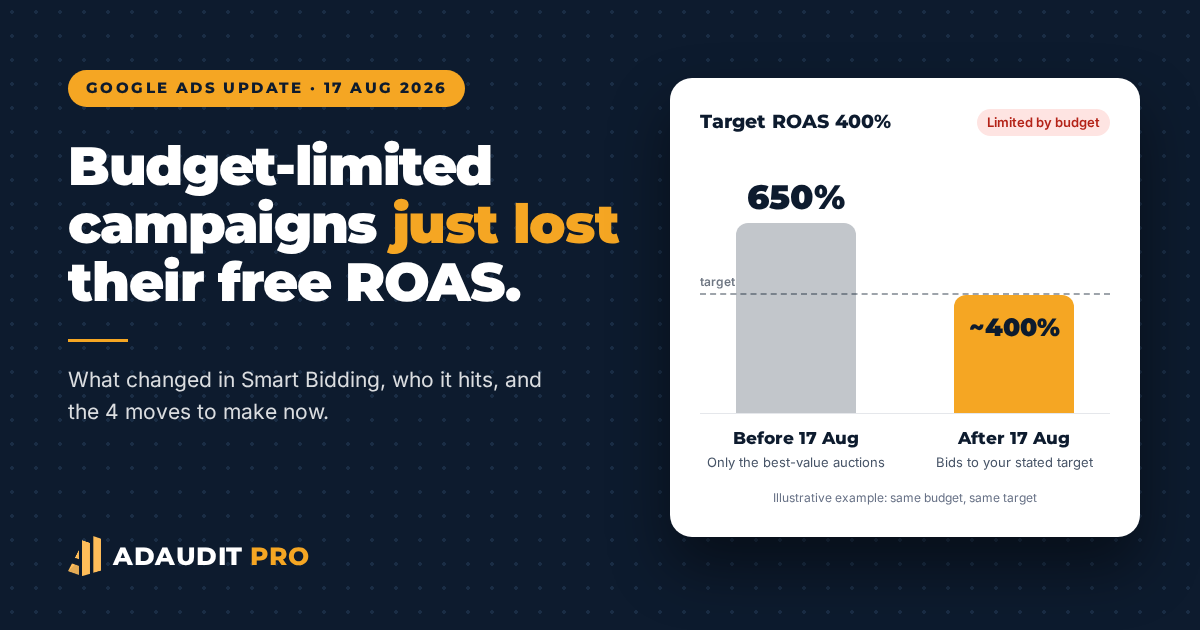
On 17 August 2026, Google made a quiet change to Smart Bidding. If you use Target ROAS or Target CPA campaigns that are “Limited by budget,” the way Google spends your money is now different, and you might already see changes in your results.
Some advertisers have noticed their ROAS moving closer to their target. Others have seen their cost per conversion go up. Many small businesses haven’t noticed any changes, simply because they were not told to check.
In this post, we will explain what changed, which campaigns are affected, whether this is actually bad news, and share our top four recommended actions, in order of importance.
What Changed on 17 August?
Before the update, campaigns limited by budget acted a bit differently. Since they could not enter every auction, Smart Bidding would only bid in the most efficient ones—going after the cheapest clicks from people most likely to buy.
As a result, these campaigns often performed much better than their targets. For example, you might have set a Target ROAS of 400% but ended up getting 600% or more. The budget cap worked like a hidden efficiency filter.
Starting 17 August, Google separated these two controls. Now, your budget decides how much you spend, and your target decides how efficiently you spend it. Budget-limited campaigns no longer focus only on the best-value auctions. Instead, they spread spending more evenly and bid to the target you set. Google says this change was rolled out worldwide by 27 August.
In short, if you were beating your target just because your budget was tight, that extra efficiency is no longer there.
Which Campaigns Are Affected?
According to Google’s help centre and the PPC industry coverage since the announcement, the change applies to:
- Bid strategies: Target ROAS and Target CPA (plus Target CPC in Demand Gen campaigns).
- Campaign types: Search, Shopping, Performance Max, Demand Gen and Travel.
- Status: only campaigns that are limited by budget. Campaigns with room in their budget behave as before.
It does not affect Manual CPC, Target Impression Share, App campaigns, or Video reach and view campaigns. Display and Hotel campaigns already worked this way before August.
Important: Google does not automatically change your targets or budgets. Your daily and monthly budget caps are still respected, so you will not suddenly spend more. What changes is how efficiently you spend that same budget.
A Simple Example
Imagine an online shop spending £30 a day on a Shopping campaign with a Target ROAS of 400%. The campaign is limited by budget.
- Before 17 August: Smart Bidding cherry-picked the best auctions. The campaign spent its £30 and returned about £195 in sales, a ROAS of 650%.
- After 17 August: the campaign still spends £30, but now bids across a wider range of auctions to hit the 400% target. It may return closer to £120 in sales.
You have the same budget and the same target, but the results are very different. Nothing is broken—the campaign is just following the settings as they are. The target was outdated, and the tight budget had been hiding that. (These figures are illustrative, not from a real account.)
Is This Actually Bad News?
Not necessarily. Many advertisers were worried when the change was announced, but there is actually a positive side.
With the old system, increasing the budget on a capped campaign was risky. As soon as you raised the cap, the hidden efficiency filter was gone and ROAS often dropped a lot. This made it hard to predict results when scaling up.
Now, the target is the one clear signal for efficiency. If your campaign meets your target at £30 a day, it should work the same way at £60 a day. This makes results more stable and growth decisions much easier, as long as your targets match your business needs.
The real risk is not the update itself. The problem is running a campaign with a target set months ago that was never reviewed and only looked good because the budget was too low.
What Should You Do? Four Moves, Ranked
1. Wait and See Before You React
Do not make big changes just because of a few bad days. Smart Bidding needs time to adjust after any change, and Google recommends waiting one or two conversion cycles before judging the results. By now, almost four weeks after the update, most accounts should have enough data to see what is really happening.
Compare your results since 17 August with the same period before it. Focus on ROAS or CPA, conversions, and conversion value—not just clicks.
2. Raise Your ROAS Targets (and Budgets) Gradually
If your results are now closer to a target that is too low for your business, increase the target. Make small changes of about 10 to 20% at a time, and wait a week or two between each change so the algorithm can adjust.
If you liked the efficiency you had before, set your target close to the ROAS you were getting before August. Google has added a bid target adjustment tool in the interface to help you match your targets to recent results.
If your campaign is profitable at the new target, start increasing the budget gradually. With the new system, a higher budget should give you more volume at about the same efficiency, instead of the sudden drop you might have seen before. The goal is to find a new balance between volume and efficiency.
3. Use Maximise Conversion Value If You Want a Steady Daily Spend
Some businesses just want to spend a set amount each day and get the best results possible. If that sounds like you, and your campaign worked well with a fixed budget before, think about switching to Maximise Conversion Value (or Maximise Conversions for lead generation) without a target.
This strategy uses your daily budget and aims for the highest total value it can get. It works well for small budgets because it doesn’t try to meet a target a tight budget cannot support.
4. Set Maximum Bid Limits as a Guardrail
While the algorithm is adjusting, setting a maximum CPC limit can help prevent costs from getting too high in expensive auctions. A good starting point is three to four times your average CPC. This is high enough for Smart Bidding to work, but low enough to stop runaway bids.
For Search and Shopping campaigns, you can set a maximum bid limit using a portfolio bid strategy in the Shared Library. Think of this as a safety measure, not a way to control efficiency. Your target now handles efficiency.
A Quick Checklist for Small Businesses
- List every campaign showing “Limited by budget” that uses Target ROAS or Target CPA.
- Compare its actual ROAS or CPA with its target, before and after 17 August.
- Decide whether the old gap was intentional or just a stale target.
- Adjust the target in 10-20% steps, or switch to Maximise Conversion Value for fixed budgets.
- Add a maximum CPC limit of three to four times your average CPC.
- Wait one to two conversion cycles before the next change.
One more thing: do not set a low ROAS target just to keep spending down. That old method does not work like it used to. Use your budget to control spending and your target to control efficiency.
How AdAudit Pro Helps
This is the kind of change that often goes unnoticed by busy business owners. Google does not warn you when your targets are out of date, and your Optimisation Score will not alert you either.
Our All-in-One Audit connects to your Google Ads account in read-only mode and checks each campaign’s bid strategy, budget, and target against your actual results. It highlights budget-limited campaigns, targets that do not match performance, missing bid limits, and campaigns that might need a different strategy. You get a ranked list by urgency, a clear action plan, and a specialist review.
Frequently Asked Questions
Will this update make me spend more money?
No. Your daily and monthly budget caps are still enforced. The change affects how efficiently you spend your budget, not how much you spend.
My campaign is not limited by budget. Am I affected?
No. The change only applies to Target ROAS and Target CPA campaigns (and Target CPC in Demand Gen) that are limited by budget.
Did Google change my targets for me?
No. Google does not adjust your targets or budgets automatically. If your target was out of date before August, it is still out of date now.
Should I switch back to Manual CPC to avoid this?
Usually not. Manual CPC is not affected, but it gives up the auction-time signals that make Smart Bidding effective. For most small accounts with enough conversions, a well-set target or Maximise Conversion Value is a better choice.
Not Sure Whether Your Campaigns Were Hit?
Get your All-in-One Audit for £55. Read-only access, no contract, and a specialist-reviewed report showing exactly which campaigns need attention.
Sources: Google Ads Help, “About changes to target-based bidding for campaigns limited by budget” (support.google.com/google-ads/answer/17061251); Optmyzr, “Google Ads August 2026 bidding update”; PPC Hero, “The silver lining of August 17”; Search Engine Roundtable coverage, July 2026. Example figures are illustrative. AdAudit Pro is a trading name of George Own Ltd.